
Out there in today’s software world, moving fast while staying stable matters most. Firms such as Netflix, Amazon, and Google push changes many times each day – yet things keep running. That smooth flow comes from a core DevOps practice known as the CI/CD pipeline.
Automation takes over when code changes happen. That setup means less hands-on effort during updates. Think of it as a system where building, checking, testing happens without delays. Speed improves because steps follow one after another smoothly. Mistakes drop since machines handle repeat tasks. Each change moves through stages without waiting around. Safety increases with constant checks at every point. Consistency comes from using the same path each time. Reliability grows when human error fades out. Software reaches users faster than before.
Picture this blog as a clear look at CI/CD, stripped of jargon. Instead of theory, it shows how actual teams push updates across big setups. Each step unfolds like scenes from daily workflows. Think less textbook, more behind-the-scenes glimpse. Real deployments? They follow paths built on repetition, checks, then release waves. This is that process, minus the noise.
Understanding CI CD Pipelines?
Code moves step by step from creation to live use, guided by automatic processes. Rather than people running tests or updates by hand, software handles each task on its own.
From the start, each code update gets checked carefully before moving forward. Only once it passes all steps does it reach those who use the software. With this flow, mistakes slip through less often. At the back end, pieces fit together smoothly because testing happens early. Delays fade when tasks link clearly from one stage to the next.
Smooth workflows happen when dev meets ops, making this piece central to how DevOps functions. Not every part links teams like this does during the build process.
Table of Contents
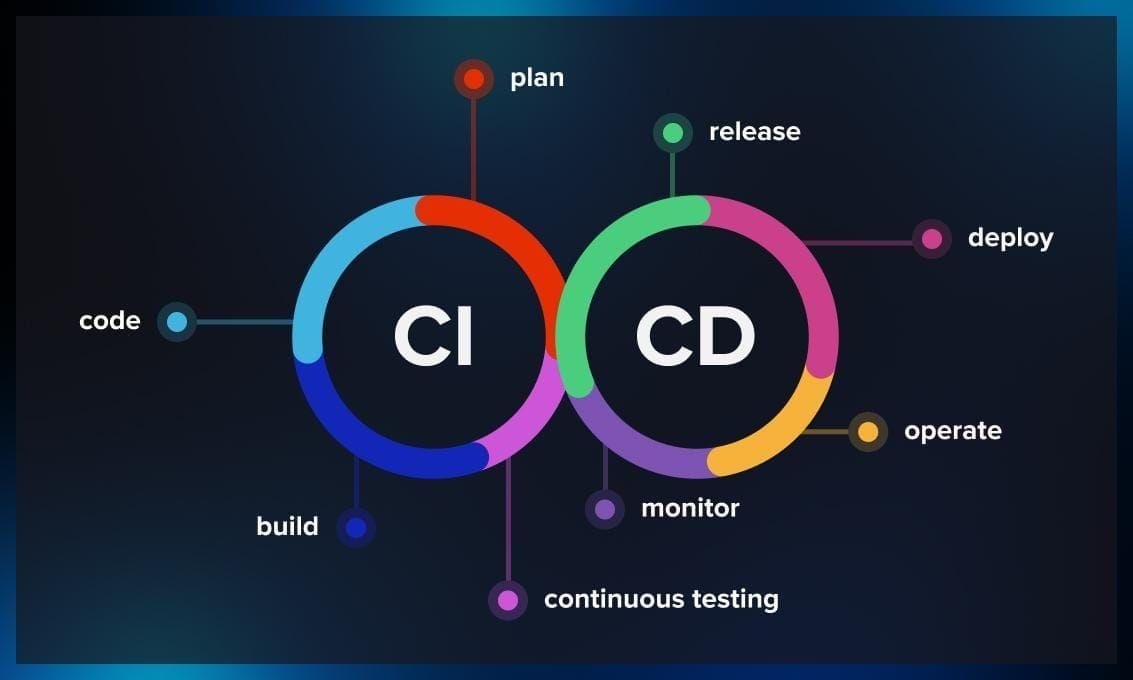
Continuous Integration (CI)
Code flows into the pipeline starting here. Merging happens often when builders add changes to one main spot.
Each time someone adds fresh code, a build kicks off right away – errors show up fast because testing runs without delay. Catching problems happens sooner now, long before the project wraps.
A single coder might introduce a fresh function while someone else tweaks that same section – right away, automated systems spot the clash, alerting everyone involved. Suddenly, tension in matching updates becomes visible before it grows.
Code grows clearer through this method while merging pieces becomes smoother. By refining each step, errors fade as work flows better together.
Continuous Testing
Once it’s added, tests run by machine check the code. That way, mistakes are caught before they cause trouble.
Some checks happen at the code level, while others look at how pieces work together – performance scans show up now and then. Testing might zoom in on single parts, yet often connects bigger chunks just to see what shakes loose.
Running tests automatically cuts down how long things take while keeping results steady. Tools zap through checks fast – no slow hand inspections – then show what happened right away.
Continuous Delivery
Every time the code clears testing, it sits waiting – set for deployment without delay. Once checks finish, the system lines up the app, ready to go live at any moment.
Right now, the software sits in a staging area, ready for extra checks or trials prior to launch. It waits there until teams confirm it works as expected. Only then does it move forward. No surprises allowed.
Here’s the core thought: pushing updates turns into something straightforward, almost effortless. A single click – or maybe an automatic signal – sends the app live without hassle.
Continuous Deployment
Every update moves straight to live once tests clear. This method skips manual sign‑off entirely by pushing through each verified tweak right away.
Most businesses needing quick updates rely on this method. Right away, people get access to fresh functions or repairs through it.
Still, without solid checks, shaky updates might slip through. A steady flow of dependable changes needs sharp oversight. Only when tested well does anything move forward safely.
How CI/CD Pipelines Work Outside Theory
Picture a group building a website together when thinking about CI/CD hands-on.
From the start, a developer puts together lines of code before sending them into a shared space. Right after that, the build process kicks in through automation, checking each part closely. When tests come back clean, only then does it slide forward toward release. Without delay, every successful round opens the door to deployment.
After that comes testing in a near-live setup before anything moves forward. Only when signed off does it go live, ready for people to use.
Minutes might pass before it finishes, yet the steps move without pause, linked like gears turning on their own.
Better software delivery through automation
Faster releases stand out when using CI/CD pipeline. With it, teams push changes quicker than they ever did doing everything by hand.
Each update gets checked by automated tests before going live, which helps catch problems early. Because of this, fewer errors make it to people using the app.
One big plus? Less hands-on work. When developers skip chores such as running tests or pushing updates, hours add up. Efficiency climbs without extra strain.
Working together gets easier when teams share a steady rhythm in building software. A smooth path from start to finish helps everyone stay on track. Clarity comes through consistent steps taken each time code moves forward.
Tools Used in CI/CD Pipeline
From Jenkins to GitLab, software teams pick varied helpers for their workflow machines. Each one handles tasks like testing or deploying without needing hands-on steps.
Code gets pieced together using certain tools, whereas different ones manage checks, release steps, plus oversight tasks. Well-known options often involve systems that automate builds, environments built around containers, also setups hosted in the cloud for pushing out software.
A single job defines what each tool handles inside the system. Efficiency shows up when reliability follows through step by step. One piece fits only where it belongs.
Difficulties Setting Up Continuous Integration and Deployment
Even with its strengths, CI/CD pipeline brings complications. Getting the pipeline right takes careful thought, then precise setup follows after.
Mistakes might slip into live systems when test plans lack clarity. Just like that, clumsy automation workflows tend to slow things down rather than accelerate them.
Built right, these systems help teams catch problems early – so firms spend effort creating solid tests along with careful oversight for their workflows.
Final Thoughts
Software moves quicker when teams automate every step. From start to finish, the workflow runs smoother because machines handle tasks once done by hand. Speed grows, risks shrink, while consistency strengthens behind the scenes.
Starting at coding, moving into launch – each step flows smoothly into the next. Because of this link between phases, work moves faster while building stronger, more dependable software.
Most folks diving into coding, system operations, or managing apps in the cloud need to get CI/CD. That’s where they see how programs actually come together and roll out across big systems.
Still moving forward, tech makes CI/CD stick around as a core part of how software gets built today.