
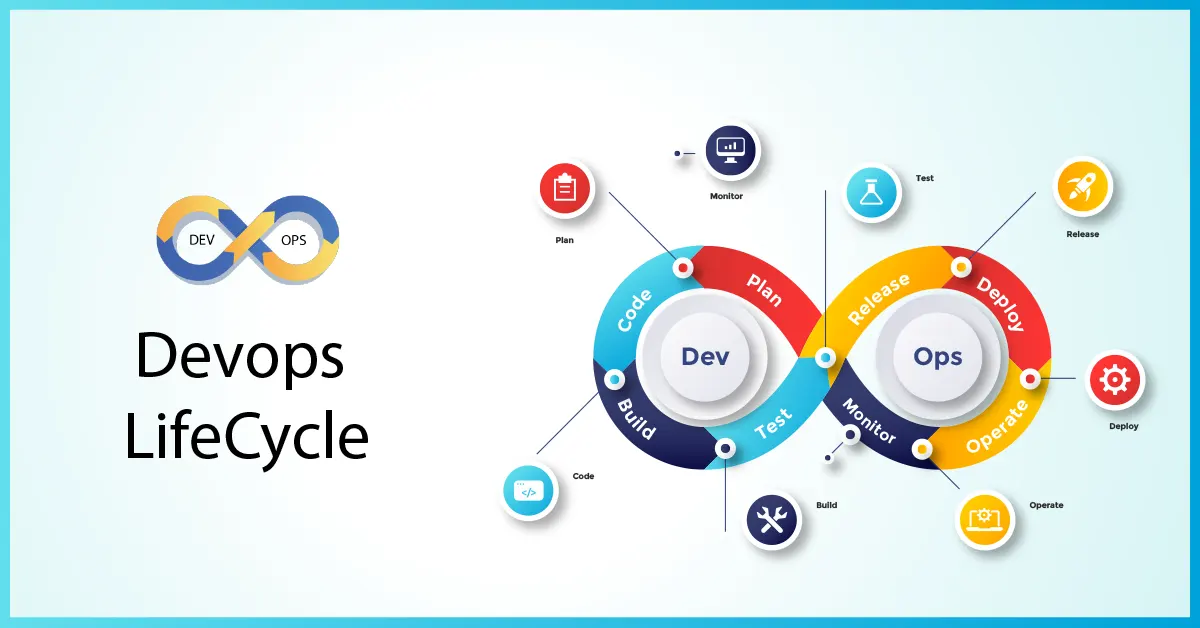
From thought to live app, the path teams take today runs on DevOps. Not step-by-step handoffs but smooth loops keep things moving forward. Machines handle repetitive tasks so people spend time solving real problems. Working together closely, developers and operations share responsibility throughout. Progress isn’t measured in big launches but small updates arriving nonstop. Each change gets tested fast, caught early if it breaks anything. Feedback flows back instantly, shaping what comes next without delay. This devops lifecycle repeats – always adjusting, never truly finished.
Most businesses live by this cycle every day. Not something imagined, but a clear path guiding how code gets made quickly, checked well, different from chaos. Each stage keeps things working when updates arrive. Anyone stepping into coding jobs, handling cloud setups, or managing deployment flows must get how it fits together, otherwise confusion follows.
Table of Contents
DevOps Lifecycle Explained?
Starting off, the DevOps cycle never really stops – it rolls right through every part of building software, step by step. Instead of isolated phases like in old-school methods, one piece flows into the next without pause. Work moves forward because steps link together, not sit apart. This whole path runs all the time, tying planning straight through to watching how things perform.
Together, developers, testers, and operations share responsibility across every stage – no longer split off from one another. Because of this shift, releases happen quicker, mistakes drop, systems run smoother.
Planning Stage
Out of nothing comes a plan – each detail picked slowly. This is where folks sketch the parts that must exist, alongside what headaches it’ll fix.
Most folks think planning means brainstorming. Yet behind every idea comes clear requirements, solid targets, a real grasp of what users actually want. Through DevOps, the process never stops – teams tweak approaches constantly, shaped by how things perform, reactions they get. Adjustments happen all the time, quietly, without fanfare, driven by results instead of guesses.
Development Stage
Only after plans are set does coding begin. From here, pieces slowly form what will become the working program.
Working in tiny chunks defines how software gets built within DevOps settings. Each change finds its place through tracking tools that help coders work alongside one another smoothly.
Mistakes show up faster when the code stays neat and sorted. How things are set matters just as much as how they work.
Continuous Integration (CI)
Most teams using DevOps rely on Continuous Integration. Merging code often into one place is what it involves.
When fresh code arrives, tests run right away so nothing in the current setup gets disrupted. Catching issues fast makes the software more reliable over time.
Midway through building, tests already begin piling up. From the start, checks weave into each step rather than sit idle. Progress moves forward only as verification tags along. Each phase carries its own round of scrutiny. Evaluation never waits for a finish line to get involved.
Testing Stage
From the start, testing stands out as a key piece of DevOps work. At this point in the process, teams look closely at software to catch flaws, spot speed problems, or uncover weak spots in protection.
Testing moves faster when software handles it, catching mistakes early. When scripts take over, they check many scenarios at once, giving quick results back to those building the system.
When a problem shows up, developers fix it first – only then does work continue forward.
Continuous Delivery (CD)
Every time the code clears testing, deployment prep kicks off without delay. Ready-to-go software sticks around thanks to automatic updates.
Deployment might wait, yet the system stands ready whenever launch is required. Delays shrink because updates go out fast the moment they’re called for.
Deployment Stage
Software reaches people through deployment. Automation handles this step in DevOps setups – updates roll out on their own, no hands needed. New versions appear quietly when ready.
These days, businesses rely on cloud systems along with automation tools to release apps without hiccups. That way, everyone using the software gets the newest updates right away.
Monitoring Stage
Once it’s live, the system stays under watch so things keep running smoothly. Because problems can pop up anytime, tools record how fast it works, spot glitches, when people struggle using it.
When something goes wrong, warnings pop up right away, letting the team step in fast. Because of that, the system stays steady while people using it get smoother results.
Back at square one, monitoring pours right back into planning – so DevOps keeps turning like a wheel without stops.
Feedback and Improvement
Feedback never stops in DevOps – it shapes how code evolves. Monitoring tools gather real-world behavior, then teams adjust what they build because users show exactly where things work or fail.
This way, decisions improve because teams respond to actual user behavior instead of guesses. Problems get sorted sooner since alerts come straight from usage patterns. New functions appear when people actually ask for them, not just because someone thinks it’s a good idea. Stability grows slowly, like layers building without cracks. Efficiency sneaks in through small tweaks that pile up quietly.
How the DevOps lifecycle affects software work
Smooth handoffs happen when developers and operators share goals. One step flows to the next without waiting. Work moves faster once repetitive tasks get automated. Teamwork gets stronger when silos break down.
Because things move fast now, firms that update swiftly tend to stay ahead. Quality stays strong when changes happen without delay. Meeting what users want becomes easier at pace. Speed matters more than ever in tech these days.
Real-World Example
Picture something like Netflix or Instagram. Updates roll through them all the time – fresh tools appear, glitches vanish, things just work better. Each change slips in without making noise.
Not everything visible matters just as much as what happens out of sight. Updates move step by step – first imagined, then built – before they face checks that confirm stability. One wrong shift could ripple outward yet careful staging keeps things steady. After release comes quiet observation, watching how changes behave once live. Each phase links quietly, like threads holding a fabric together.
That’s the reason these systems manage huge crowds without slowing down. Smooth speed stays intact, even under pressure.
Final Thoughts
Software moves faster because of constant automation woven into how teams build it. Built right, checked well – speed reaches people without waiting.
Peering into every phase of this cycle opens a window on how apps take shape in daily practice, then stay alive through updates. Though hidden at first glance, these steps reveal patterns others miss when building software people actually use.
One step ahead, tech moves fast – DevOps sticks around right at the heart of how software gets made. Teams shape stronger systems, not by chance but through steady practice.
Also Check What is DevOps – Comprehensive Guide – 2026